Editorial illustration.
Suno calls V6 its best models yet, and they arrived with a catch: since September 3, 2026, the songs you can take off the platform are rationed. Pro gets 20 song downloads a month and Premier gets 60. WaveQuake sells the opposite deal: one $149.99 payment, Unlimited Standard Generations and Unlimited Downloads. We scored both studios across nine categories that decide what a regular creator can actually make, finish and keep, working from each company's own pricing, terms and help pages as published on 30 October 2026. WaveQuake leads 83.7 to 62.1 out of 90, and it is our pick. Suno V6 comes within 0.2 points on editing, and that is the category to weigh before you choose.
Key takeaways
- WaveQuake scores 83.7/90 (9.3/10); Suno V6 scores 62.1/90 (6.9/10). WaveQuake leads in all nine categories.
- The widest gaps are generation freedom (9.8 vs 5.8) and downloads (9.6 vs 5.6). WaveQuake has no fixed cap on standard songs or on downloads of retained files. Suno meters creation in credits and allows 20 or 60 song downloads a month.
- The closest category is editing (8.5 vs 8.3). Suno V6 can change one section or a single lyric in plain language, and Premier adds Suno Studio with MIDI, effects and automation.
- Cost depends on how long you create. Suno Pro at $96 a year costs less than WaveQuake in year one. Premier's first $288 yearly payment already costs more, and Pro's second yearly payment takes it past WaveQuake's one payment.
- These are editorial workflow scores, not sound-quality scores. WaveQuake's own published model benchmarks, reported in full below, are a separate question.
In this article
- The scorecard at a glance
- How we scored the two studios
- 1. Cost predictability
- 2. Output freedom and standard generations
- 3. Included mastering and finishing
- 4. Licensing clarity
- 5. Downloads and file retrieval
- 6. Generation-to-release workflow
- 7. Editing and workflow control
- 8. Voice profiles and AI artist creation
- 9. Commercial workflow at scale
- Keep these scores separate from audio benchmarks
- Which studio should you choose?
- Our verdict
- Related reading
- Frequently asked questions
Galvanized Souls editorial scores: WaveQuake 83.7/90 (9.3/10), Suno V6 62.1/90 (6.9/10). These are subjective editorial ratings of how well each studio fits a regular song creator, based on the plans, terms and features each company publishes. They are not listening scores, render-speed timings or vocal-similarity results.
The scorecard at a glance
| Category | WaveQuake | Suno V6 |
|---|---|---|
| Cost predictability | 9.7 | 6.4 |
| Output freedom and standard generations | 9.8 | 5.8 |
| Included mastering and finishing | 9.4 | 6.1 |
| Licensing clarity | 8.9 | 6.7 |
| Downloads and file retrieval | 9.6 | 5.6 |
| Generation-to-release workflow | 9.1 | 8.2 |
| Editing and workflow control | 8.5 | 8.3 |
| Voice profiles and AI artist creation | 9.2 | 7.9 |
| Commercial workflow at scale | 9.5 | 7.1 |
| Total | 83.7/90 | 62.1/90 |
| Overall | 9.3/10 | 6.9/10 |
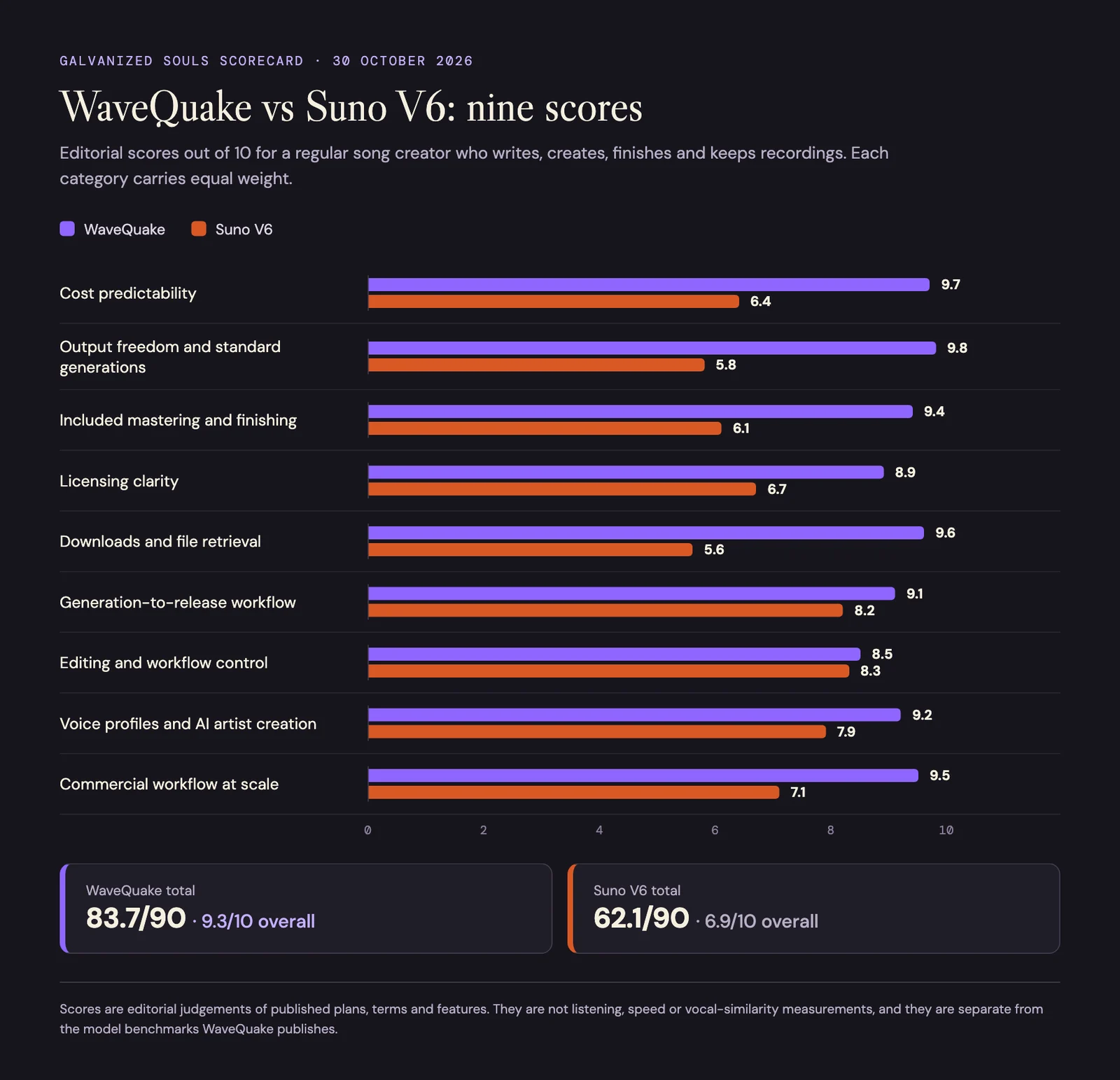
Our nine scores side by side. The gap is widest on downloads and generation freedom and narrowest on editing.
How we scored the two studios
Each category is worth ten points and carries equal weight. Adding the nine scores gives 83.7 for WaveQuake and 62.1 for Suno V6; dividing each total by nine gives the overall ratings of 9.3 and 6.9.
The reader we scored for is a regular song creator: someone who writes, creates, finishes and keeps recordings week after week, and who would rather not juggle recurring allowances. That brief matters. Generation freedom, downloads and commercial workflow overlap, so this framework gives real weight to the economics of repeated use. A producer who cares most about detailed section editing, MIDI or stem work could reasonably rank the two differently, and we say where.
The scores rate published plans, terms and features. They do not rate how the songs sound, how quickly a render returns, how closely a converted voice matches its reference, or what you might earn. They also use a different brief from our ranking of the best Suno alternatives for quality, so the overall numbers on the two pages are not interchangeable.
1. Cost predictability
Our scores: WaveQuake 9.7/10 | Suno V6 6.4/10
WaveQuake's founder offer is $149.99 as a single payment, and its terms say that total already includes any applicable VAT or sales tax. Standard generations, downloads of retained files and mastering come with it. There is no monthly subscription and no annual renewal, which makes the core purchase easy to budget if making music is a habit rather than a one-off.
There are boundaries, and they are why this is 9.7 rather than a perfect score. Writing requests and recorded-voice conversion have their own allowances, storage is finite, and WaveQuake says the $149.99 price will rise to $499.99 after the founder offer ends.
Suno's pricing page lists Pro at $8 a month and Premier at $24 a month when billed yearly, with taxes calculated at checkout. Billing monthly costs $24 a year more on Pro and $72 more on Premier, according to the same page. Pro is therefore $96 for a year, which is cheaper than WaveQuake's upfront price. WaveQuake's advantage is repeated use without renewal, not the lowest entry cost for every buyer.
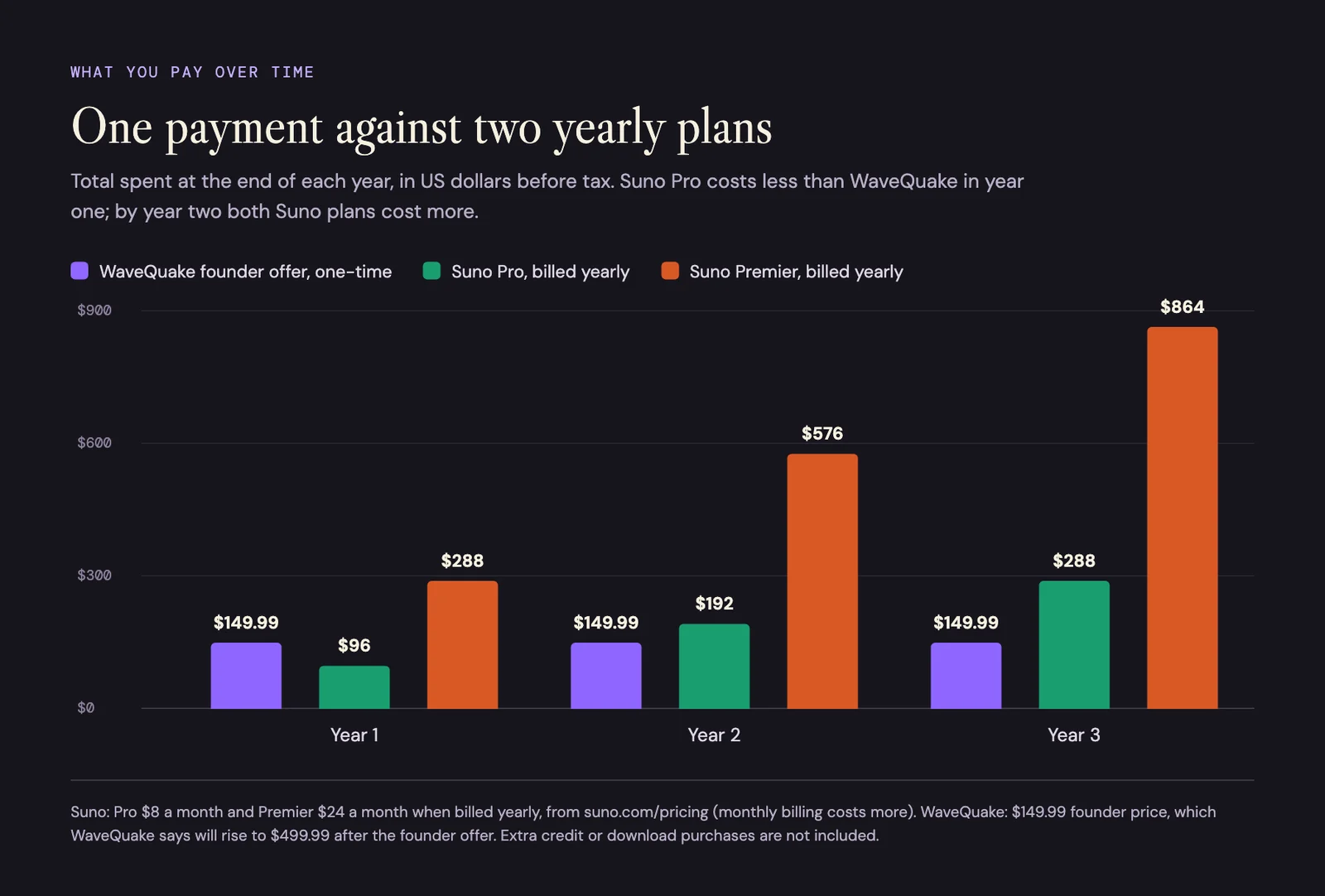
Total spent by the end of each year, in US dollars before tax, with both Suno plans billed yearly.
The arithmetic is simple. Billed yearly, Premier's first $288 payment is already more than WaveQuake's one payment, and Pro's second yearly payment takes it to $192. Billed monthly, at $10 and $30, Pro passes $149.99 in its fifteenth month and Premier in its fifth. If the founder price ends and WaveQuake costs $499.99, Premier's second yearly payment still passes it, but Pro would need six. Buy at the founder price if the one-time model is the reason you are switching.
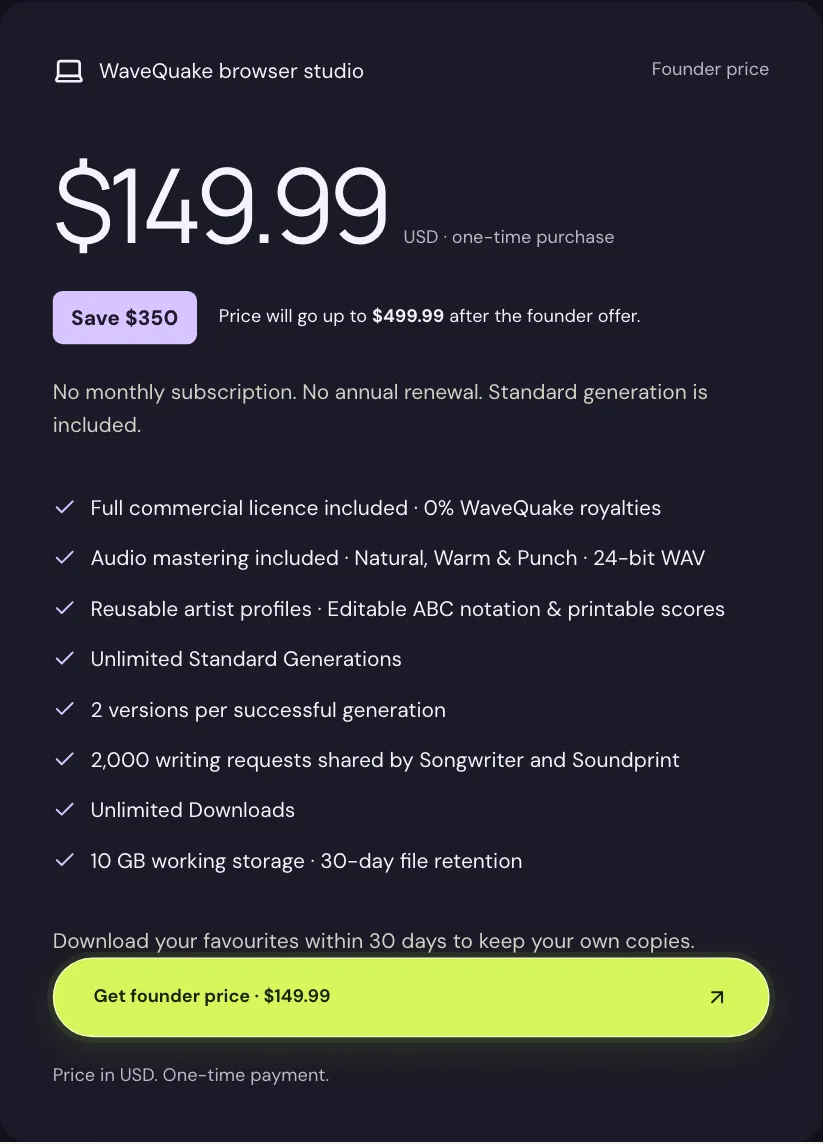
WaveQuake's pricing card, captured 30 October 2026.
2. Output freedom and standard generations
Our scores: WaveQuake 9.8/10 | Suno V6 5.8/10
WaveQuake includes Unlimited Standard Generations of songs and covers. Its terms describe "unlimited Standard song generation and covers without a fixed daily or monthly numerical cutoff while the service operates", and each successful request returns two versions. For a creator rewriting a chorus or trying a third musical direction, that removes the credit calculation from every attempt. The terms add that "High legitimate use alone is not abuse."
Unlimited still has practical edges. Two music jobs can be active per account, and WaveQuake says standard waits lengthen with heavy use over a rolling 24 hours and with demand. Working storage is 10 GB, completed files are kept for 30 days, Songwriter and Soundprint share 2,000 writing requests, and recorded-voice conversion has its own 3,000-minute allowance. WaveQuake's song-creation page also lists what is not included: an instrumental-only mode, advanced seed controls and score-guided generation.
Suno's credits go further than many people assume. Its v6 FAQ says each generation makes two songs for 10 credits, so Pro's 2,500 monthly credits cover up to 500 songs and Premier's 10,000 cover up to 2,000. Paid plans also queue up to ten songs at once. The limits are structural: subscription credits "do not carry over from day to day or month to month", Max Mode and image or video inputs cost more, and the free plan gets 50 credits a day. WaveQuake earns the far higher score because open-ended iteration never runs into a monthly number.
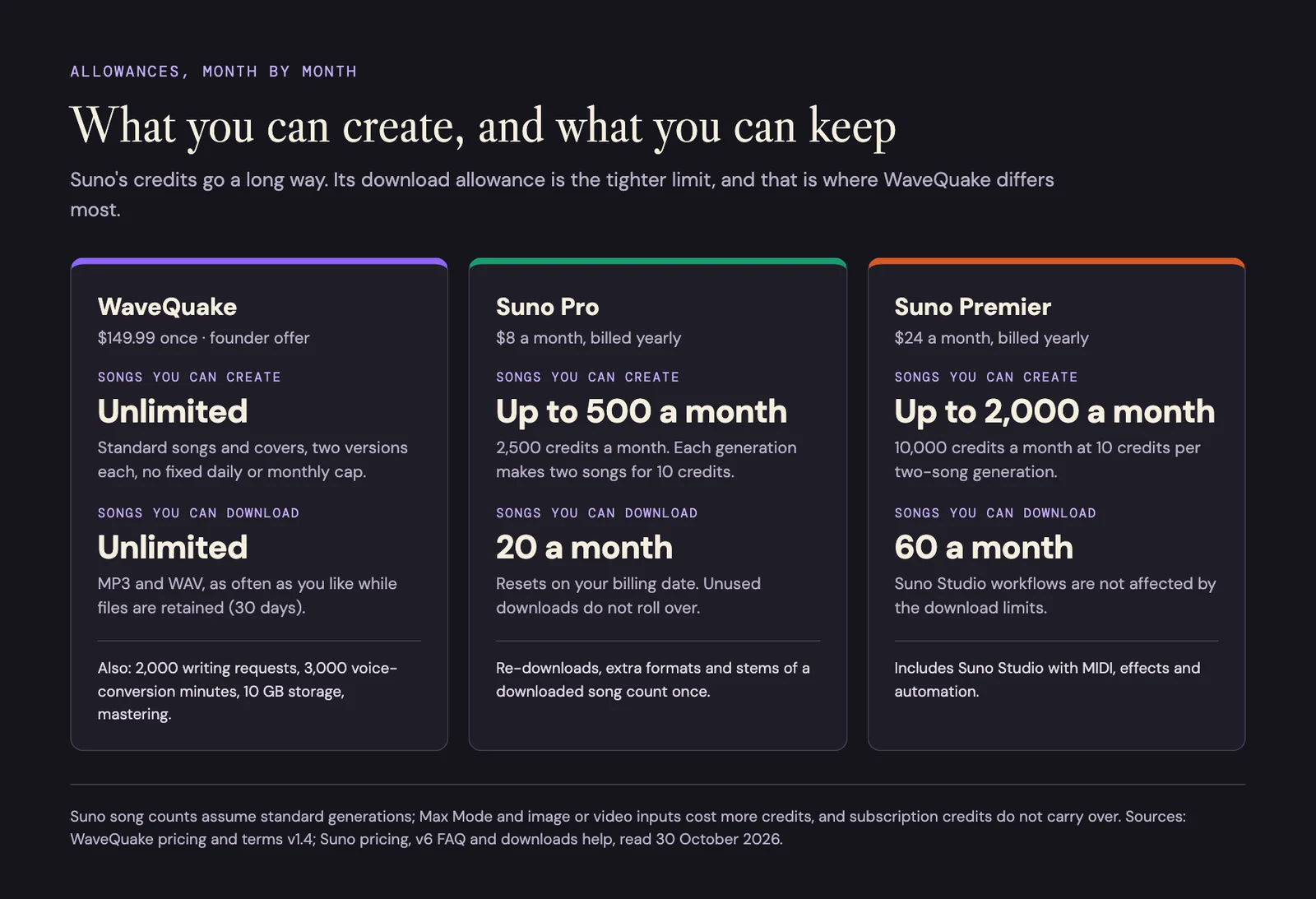
Monthly allowances side by side. Suno's credits are generous; the download allowance is its tighter limit.
3. Included mastering and finishing
Our scores: WaveQuake 9.4/10 | Suno V6 6.1/10
A generated take still needs a finishing decision. WaveQuake's mastering workspace offers Natural, Warm and Punch profiles. According to the feature page, the server "measures loudness, creates a separate 24-bit, 48 kHz WAV and checks its true peak", and your original is preserved. Being able to compare a chosen take with its finished version, inside the same purchase, is a practical part of the deal.
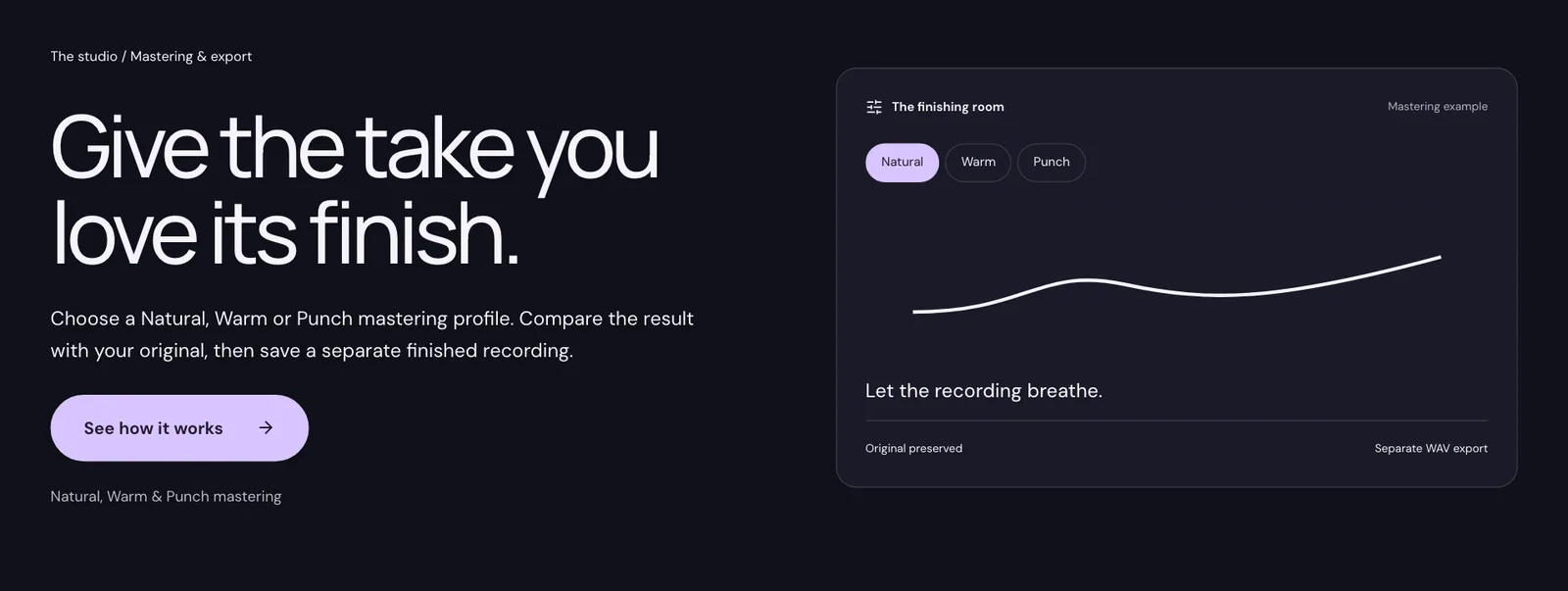
WaveQuake's mastering and export page, captured 30 October 2026.
Suno's Premier plan includes Suno Studio, which its pricing page describes as "now with MIDI, effects, automation, and design-your-own-plugins". That is genuine production flexibility, and a producer may value it more than a one-click master. Suno's pricing page does not list a mastering service. This category rewards a clearly presented, included mastering step over the breadth of a production environment.
The 9.4 reflects convenience. It does not mean WaveQuake produces a better master on every recording; WaveQuake itself says mastering "does not repair every performance or generation artifact". Listen to the full export at a matched level and choose the version that serves the song.
4. Licensing clarity
Our scores: WaveQuake 8.9/10 | Suno V6 6.7/10
WaveQuake's commercial licence comes with the studio purchase. You can "Release, sell and license your music, including for videos, games and client work", and WaveQuake states that it "takes no ownership share or music royalties". There is no separate commercial upgrade. Access to the toolkit and the vendor's commercial permission arrive together, which makes the offer easy to understand.
Suno lists commercial use rights on Pro and Premier, and none on the free plan. Its terms tie those rights to the download: you "may not commercially exploit Output that has not been downloaded by you through an approved channel". Suno's FAQ adds that you have the commercial rights to any song you download as a paying subscriber. For a seller, that links the licence to the monthly download allowance, which is why Suno scores lower here. Our guide to selling under Suno's September terms covers the detail.
WaveQuake's score stays below its generation and download ratings for a reason. A commercial licence covers only the permissions a service can grant. It does not clear someone else's lyrics, recordings or voice, and WaveQuake says so plainly: "Payment, generation or download does not prove originality, ownership or legal clearance." Rights questions still need attention on every project.
5. Downloads and file retrieval
Our scores: WaveQuake 9.6/10 | Suno V6 5.6/10
WaveQuake's terms define Unlimited Downloads as "downloading your available completed files as often as you wish, with no download credits, numerical download allowance or per-download charge". You can keep MP3 and WAV copies of every take without budgeting a monthly allowance, and downloading does not spend creation units.
Retention is the catch. Completed files stay available for 30 days within 10 GB of working storage, so download and back up promising takes as a routine. Unlimited retrieval is valuable, but it is not permanent cloud archiving.
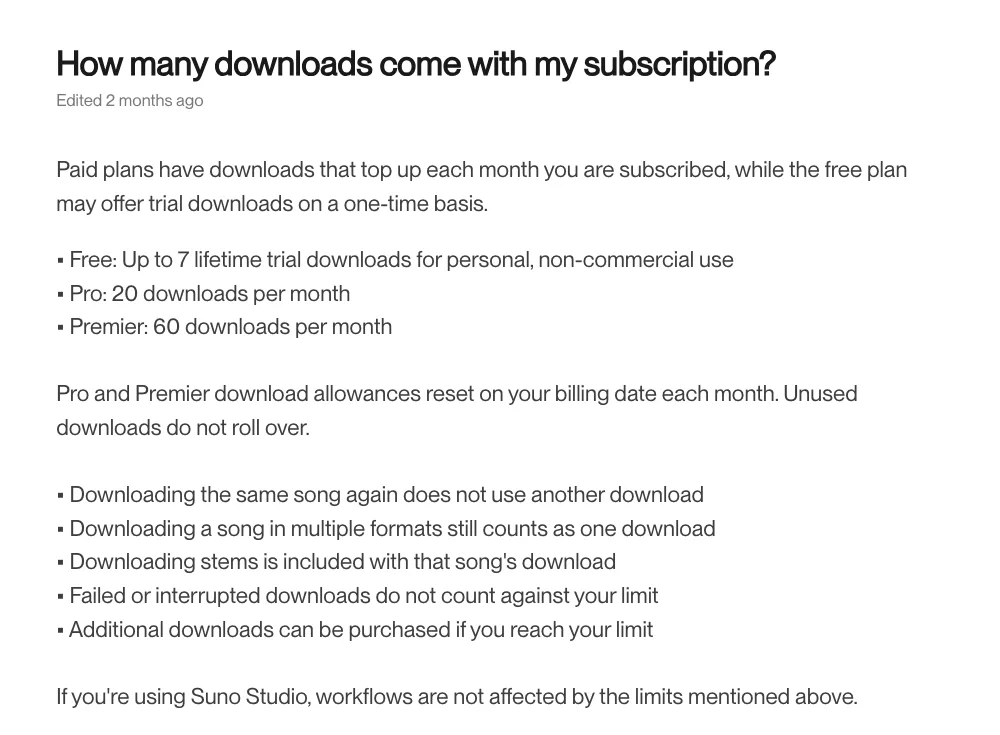
Suno's download allowances, from its help centre, captured 30 October 2026.
Suno's download help article gives Pro 20 downloads a month and Premier 60. Allowances reset on your billing date, unused downloads do not roll over, and extra downloads can be bought. Suno is fair about what counts: downloading the same song again, in more formats or with its stems, uses one download. It also says Suno Studio workflows are not affected by the limits. The changes FAQ confirms the limits cover songs made before September 3. WaveQuake earns the higher score for simpler retrieval across a growing pile of candidates, with the 30-day window reflected in the rating. Our guide to download limits and your release calendar works through what 20 or 60 a month means for a release plan.
6. Generation-to-release workflow
Our scores: WaveQuake 9.1/10 | Suno V6 8.2/10
WaveQuake connects lyric development, musical direction, creation, take selection, optional voice conversion, mastering and download in one browser workspace. The appeal is continuity: you can move through the main decisions without arranging a separate purchase for the finishing stage.
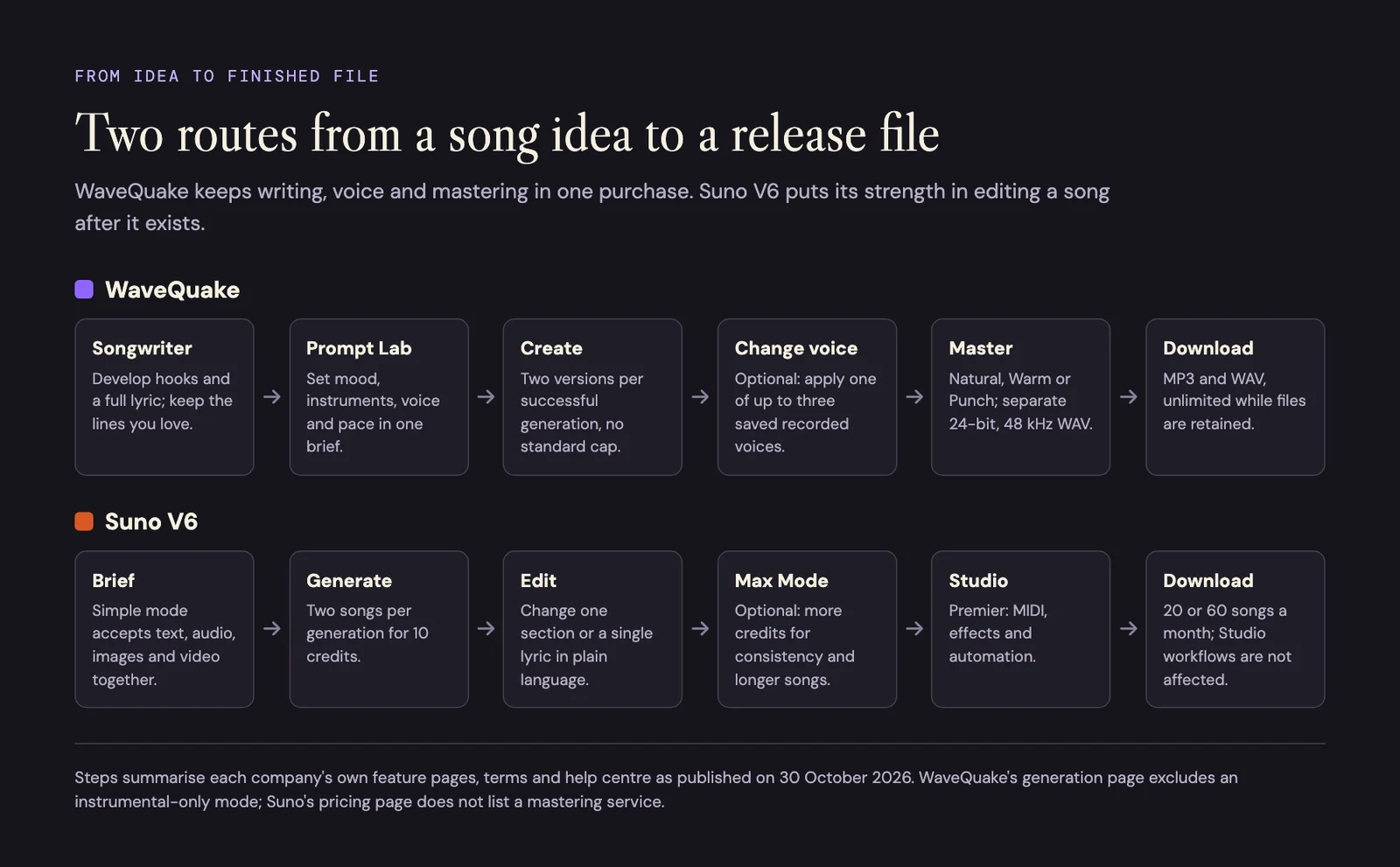
Each route from idea to release file, summarised from the two companies' feature pages and help centre.
Suno V6 supports a flexible creation process. Simple mode can take text, audio, images and video in one prompt, and you can change one section or one lyric after the song exists. When the first result is close, that cuts revision work considerably.
WaveQuake's 0.9-point lead rewards its connected finishing route. These scores make no claim about which service returns audio first. The time you spend selecting, revising and approving a recording matters as much as the first render.
7. Editing and workflow control
Our scores: WaveQuake 8.5/10 | Suno V6 8.3/10
This is the narrowest gap in the table, and the category where Suno V6 is strongest. Suno's v6 FAQ describes editing "part of an existing song using plain language", building a mashup from several of your songs in one request, sampling and isolating a part to build a new beat, and updating "a single lyric without rebuilding the entire song". Premier adds Suno Studio.
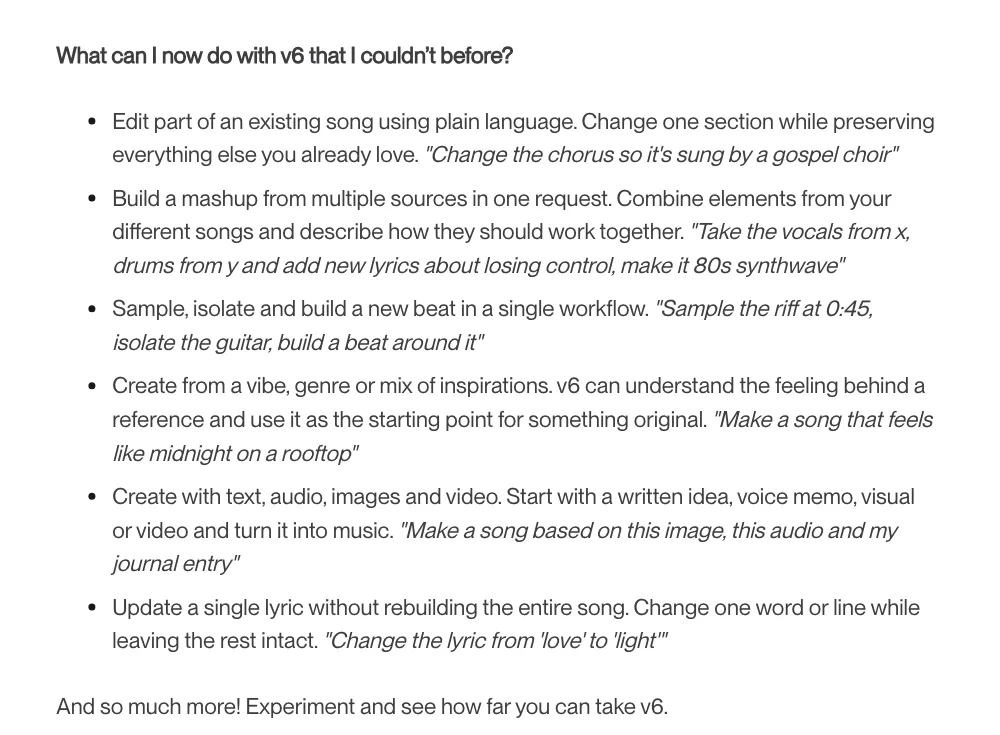
Suno's v6 FAQ on what the new models can do, captured 30 October 2026.
WaveQuake's Prompt Lab shapes mood, instruments, voice and pace into one clear brief, and it suggests holding lyrics and settings steady while you change one part, so each new take is easier to judge. Its cover workflow can rework a recording you have permission to reinterpret, and the studio imports and edits ABC notation, with a simplified printable score. That is accessible direction rather than surgical editing.
WaveQuake's small lead reflects this framework's preference for accessible direction and a connected toolkit. It is not evidence that WaveQuake has the deeper editor; on section-level changes, Suno V6 does more. Before you buy, list the actual changes you make to songs and check each one against both feature lists.
8. Voice profiles and AI artist creation
Our scores: WaveQuake 9.2/10 | Suno V6 7.9/10
Building a recognisable musical project takes more than picking a vocal tone once. WaveQuake's AI artists feature brings a name, point of view, stories, vocal brief and musical palette into one project, so the writing and the sound develop together across songs.
Its artist voices feature lets you save up to three recorded voices you have permission to use, then choose Change voice beside a finished track. Each conversion draws on the separate 3,000-minute allowance. WaveQuake is careful about the limits: results vary, and an exact singer is not guaranteed. A descriptive profile and a recorded-voice conversion do different jobs, and neither promises an identical singer on every track.
Suno's paid plans list recording, uploading and creating with your own voice, and creating custom models; Premier's listing also names personas. Its v6 FAQ recommends Max Mode for "keeping vocals and style consistent through the whole track", at a higher credit cost. WaveQuake's lead rewards the organisation of an ongoing artist project; it is not a vocal-similarity result.
9. Commercial workflow at scale
Our scores: WaveQuake 9.5/10 | Suno V6 7.1/10
When a creator moves from the occasional demo to a growing catalogue, recurring costs and file management start to bite. WaveQuake's combination of unlimited standard generation, unlimited downloads of retained files, mastering, artist profiles and a commercial licence makes its one-time package attractive for repeated work.
The 9.5 accounts for the limits as well: two simultaneous music jobs, finite storage, separate writing and voice allowances, and 30-day retention all shape how much work moves through the studio. Plan a weekly download and backup habit, and record titles and versions as you go; our metadata and ISRC worksheet is built for that.
Suno offers a substantial creative environment, but a growing release schedule means managing a subscription, a credit balance and a download allowance at the same time. The difference here concerns workflow and budgeting. It does not predict sales, distributor acceptance or earnings, and it is not a throughput timing.
Keep these scores separate from audio benchmarks
Our nine scores rate the creator workflow. They cannot tell you which model sounds better across every style, follows every prompt more closely or produces fewer artifacts. That needs its own evidence, reported with its own method.
WaveQuake publishes a model benchmark comparison. It says that "Across 17 model settings tested on the same 192 prompts, WaveQuake scored higher than Suno V6 on five measures", and that its production quality and prompt following were higher than every Suno version tested, from v4.5 to v6, including v6 Wild. WaveQuake attributes the results to the model's research team and states that "they are not human preference scores or a measurement of every song made in the hosted studio."
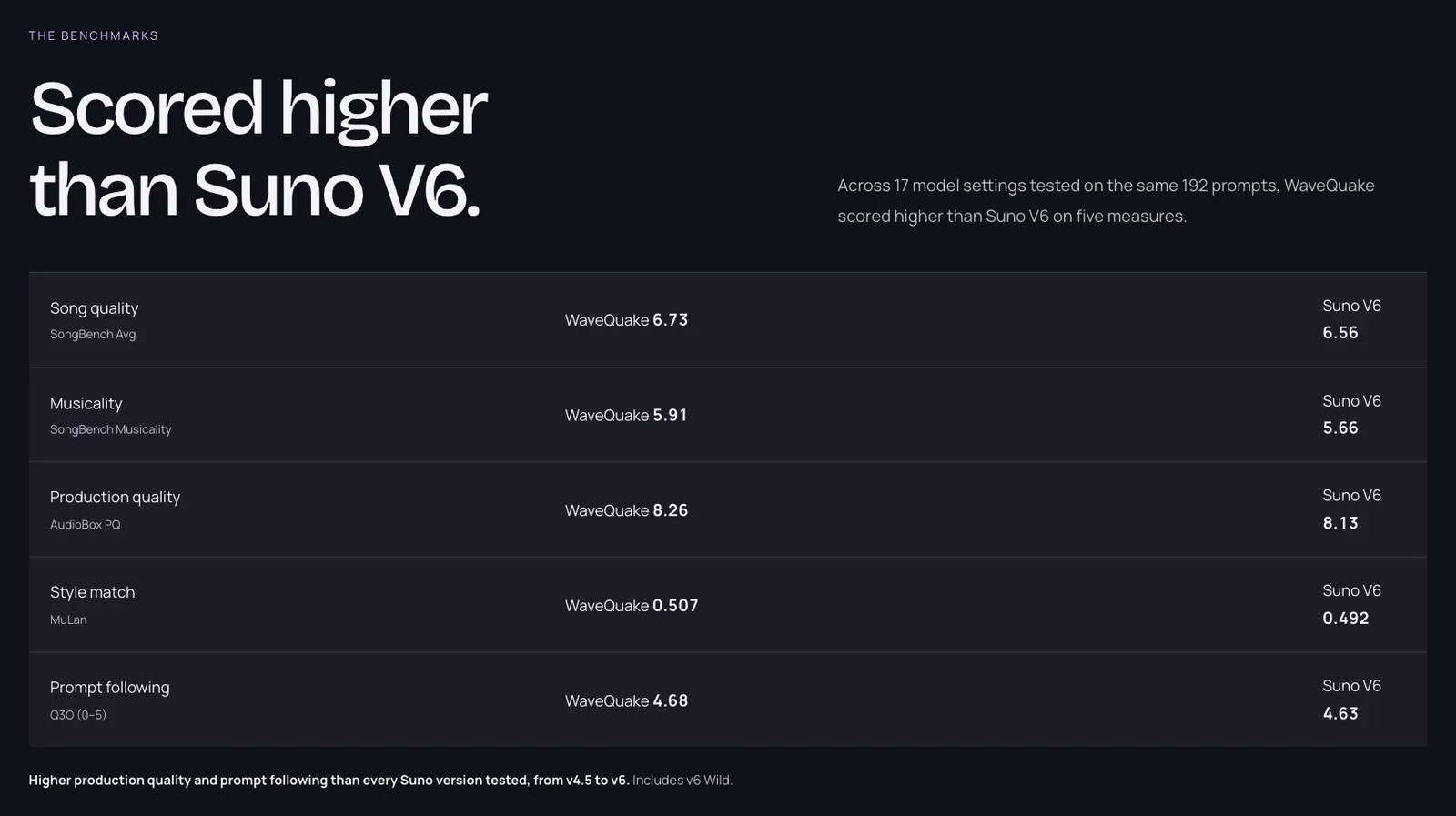
WaveQuake's published benchmark headline, captured 30 October 2026. The full table, below, has nine measures.
The full table on the same page lists nine measures for the standard model setting, and Suno V6 is ahead on four of them:
| Measure | WaveQuake | Suno V6 | Higher score |
|---|---|---|---|
| Song quality (SongBench Avg) | 6.73 | 6.56 | WaveQuake |
| Musicality (SongBench Musicality) | 5.91 | 5.66 | WaveQuake |
| Production quality (AudioBox PQ) | 8.26 | 8.13 | WaveQuake |
| Style match (MuLan) | 0.507 | 0.492 | WaveQuake |
| Prompt following (Q3O, 0 to 5) | 4.68 | 4.63 | WaveQuake |
| Song evaluation (SongEval Avg) | 4.26 | 4.31 | Suno V6 |
| Musicality evaluation (SongEval Musicality) | 4.22 | 4.26 | Suno V6 |
| Caption match (AllMusicCaps) | 0.405 | 0.430 | Suno V6 |
| Lyric error rate (PER, lower is better) | 0.0844 | 0.0758 | Suno V6 |
Those are WaveQuake's published model results, reproduced with its labels. We have not folded them into our scores, and a change to an editorial score never justifies changing a reported benchmark. For musical fit, play complete examples in the styles you actually make. Our WaveQuake review has full-length songs from its listening room.
Which studio should you choose?
Choose WaveQuake if:
- You create often and want Unlimited Standard Generations without watching a credit balance.
- You want to keep every take as MP3 and WAV without a monthly download allowance.
- You want mastering, lyric writing, artist profiles and a commercial licence in one $149.99 payment.
- You sell or license music and want 0% WaveQuake royalties and no separate commercial upgrade.
Choose Suno V6 if:
- You revise songs surgically and want to change one section or one lyric in plain language.
- You need stem separation or Suno Studio's MIDI, effects and automation.
- You make instrumentals: WaveQuake creates vocal songs and excludes an instrumental-only mode.
- You make a handful of keepers a month and want the lowest year-one cost (Pro at $96).
- You work mainly inside Suno Studio, where the download limits do not apply.
If you sell music, the download allowance is usually the deciding factor. Our seller-focused guide to the best Suno alternative works through it point by point.
Our verdict
WaveQuake: 83.7/90, 9.3/10 overall. Suno V6: 62.1/90, 6.9/10 overall.
WaveQuake wins this comparison because its one-time studio purchase joins standard generation, writing tools, artist development, mastering and downloads, with Unlimited Standard Generations and Unlimited Downloads at its centre. For a creator who makes music week after week, it is the better package and our first choice.
Suno V6 remains a serious studio where detailed revision and production control matter most. Its best scores are on editing and the generation-to-release workflow, so examine those two categories before you decide. Then check WaveQuake's current offer, its separate allowances and its 30-day retention, and judge the music against your own brief.
Related reading
- WaveQuake review: building an artist catalogue
- Best Suno alternative for sellers: WaveQuake
- Best Suno alternatives ranked for quality
- Download limits and your release calendar
- Selling under Suno's September terms
- How to price AI music
Frequently asked questions
Is WaveQuake better than Suno V6?
For a regular song creator, yes on our scores: WaveQuake leads 83.7/90 to 62.1/90 across nine categories, with its biggest leads in generation freedom and downloads. Suno V6 comes closest on editing, where its plain-language section and lyric edits are a real strength.
Which is cheaper, WaveQuake or Suno?
In year one, Suno Pro is cheaper: $96 billed yearly against WaveQuake's $149.99 founder price. Suno Premier's $288 yearly payment costs more from the start, and Pro passes WaveQuake with its second yearly payment. WaveQuake says its price will rise to $499.99 after the founder offer.
Does WaveQuake really have unlimited generations and downloads?
Yes, under its terms. Standard songs and covers have no fixed daily or monthly cap, with two versions per successful generation, and downloads of retained files carry no download credits or per-download charge. Two music jobs run at once, waits can lengthen under heavy use, and files are kept for 30 days, so download what you want to keep.
How many songs can I download from Suno each month?
Pro allows 20 song downloads a month and Premier 60. Allowances reset on your billing date and do not roll over. Re-downloading a song, extra formats and its stems count as one download, extra downloads can be bought, and Suno Studio workflows are not affected.
Where is Suno V6 stronger than WaveQuake?
Editing and production depth. Suno V6 can change one section or one lyric in plain language and build mashups from several songs, and Premier includes Suno Studio with MIDI, effects and automation. WaveQuake's song-creation page excludes an instrumental-only mode, advanced seed controls and score-guided generation.
Can I sell music made with WaveQuake or Suno?
Both allow commercial use on paid plans. WaveQuake's licence comes with the purchase and takes no ownership share or royalties. Suno's terms tie commercial use to songs downloaded through an approved channel, so its download allowance limits what you can sell. Neither licence clears third-party lyrics, recordings or voices.
Do these scores measure sound quality?
No. They are editorial scores for the creator workflow. For sound, read WaveQuake's published model benchmarks, where WaveQuake leads on five measures and Suno V6 on four, and listen to complete examples in your own style.
How this comparison was put together
We read WaveQuake's pricing page, terms (version 1.4), commercial licence and feature pages, and Suno's pricing page, terms, v6 FAQ and download help articles, on 30 October 2026. Every figure above links to one of those pages. Screenshots were captured the same day. Plans, allowances and prices change, so check both companies' current pages before you buy.