If you sell your music, Suno's September changes hit you harder than anyone: since September 3, 2026, every track you sell has to come out of a capped monthly download allowance, and commercial rights travel only with those downloads. That is why so many sellers are looking for a Suno alternative, and our answer is WaveQuake. We read Suno's terms, pricing page and help centre and WaveQuake's pricing, licence and terms on 28 October 2026, and every claim below links back to one of them.
Key takeaways
- Suno caps what you can sell. Pro allows 20 song downloads a month and Premier 60, unused downloads do not carry over, and the caps apply to songs made before September 3.
- WaveQuake has no download cap. Its terms define unlimited downloads as "no download credits, numerical download allowance or per-download charge".
- WaveQuake takes 0% of your royalties and needs no separate commercial-use upgrade, subject to its licence terms.
- Price: WaveQuake's founder offer is $149.99 once, rising to $499.99 later. Suno Premier is $288 a year, billed yearly.
- WaveQuake scored 6.73 against Suno V6's 6.56 for song quality in a model benchmark comparison published by the model's research team.
Contents
- Key takeaways
- Why sellers are moving from Suno
- Suno vs WaveQuake at a glance
- Unlimited Downloads
- Higher song-quality score than Suno V6*
- Create covers and remixes
- Capture an artist's style with Soundprint
- Create your own AI artist
- Commercial licence included. Keep your royalties
- Professional mastering included
- What switching costs: $149.99 once vs $288 a year
- How to move your catalogue from Suno to WaveQuake
- Related reading
- Frequently asked questions
Why sellers are moving from Suno
A catalogue is a stock of finished files you are allowed to sell. Suno's September terms changed both halves of that sentence. The files are now rationed: the downloads FAQ gives Free accounts "Up to 7 total (lifetime) trial downloads for personal, non-commercial use only", Pro "20 downloads per month, with commercial use rights" and Premier "60 downloads per month, with commercial use rights". And the right to sell is now attached to those rationed files: the terms say "You may not commercially exploit Output that has not been downloaded by you through an approved channel".
For a hobbyist that is an inconvenience. For a seller it is a ceiling on the size of the shop. We worked through the arithmetic in our guide to download limits and your release calendar, and the rights side in selling under Suno's September terms. This article answers the follow-up question readers keep asking: if not Suno, then what?
Our answer is WaveQuake, and the reasons below are the seven points where it fixes what Suno now does. Each section is a pair: what Suno does today, then how WaveQuake handles it.
Suno vs WaveQuake at a glance
| What matters to a seller | Suno (Premier) | WaveQuake (founder offer) |
|---|---|---|
| Price | $288 a year, billed yearly | $149.99 once, rising to $499.99 |
| Song downloads | 60 a month, no rollover | Unlimited, no download credits |
| Commercial use | Only for permitted downloads | Full commercial licence, 0% WaveQuake royalties |
| Song quality (SongBench Avg) | Suno V6: 6.56 | 6.73* |
| Covers and remixes | Remixes of your songs by other users are jointly owned and non-commercial | Text and audio reimagining of material you have permission to reinterpret |
| Reusable voice | Licence to your Content and Voice Model granted to Suno | Up to three saved recorded voices |
| Mastering | No mastering service listed on the pricing page | Natural, Warm and Punch, separate 24-bit WAV |
*Model benchmark comparison. "The model's research team published these results; they are not human preference scores or a measurement of every song made in the hosted studio." (WaveQuake)
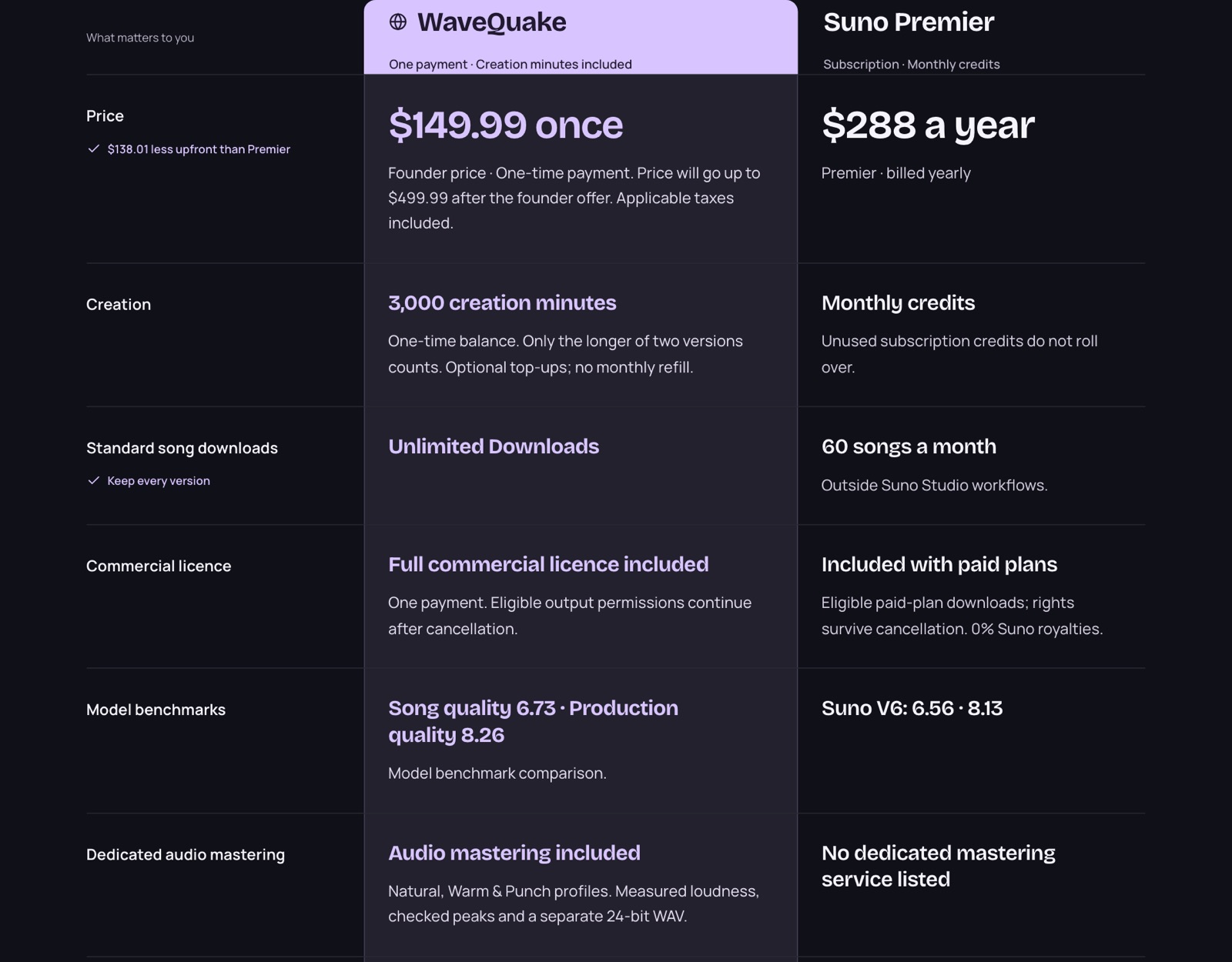 WaveQuake's own side-by-side comparison with Suno Premier, captured 23 October 2026. The figures match WaveQuake's homepage as we read it on 28 October 2026.
Unlimited Downloads
No monthly caps. Download your tracks as often as you like.
What Suno does now. Since September 3, a download is the unit Suno meters. The allowances are lifetime for Free and monthly for paid plans, and the FAQ adds three details that matter to anyone with a back catalogue: "Monthly downloads reset on your billing date", unused downloads "don't carry over", and "Download limits apply to all music on Suno starting September 3, including songs created before that date." Songs you made last spring sit inside the same cap as songs you make tonight.
| Suno plan | Downloads | Commercial use | Over a year |
|---|---|---|---|
| Free | 7 total, lifetime | No | 7, non-commercial |
| Pro | 20 a month | Yes | 240 at most |
| Premier | 60 a month | Yes | 720 at most |
| WaveQuake | Unlimited | Yes, under its licence | No numerical allowance |
How WaveQuake fixes it. WaveQuake's terms define the phrase precisely: "unlimited downloads" means "downloading your available completed files as often as you wish, with no download credits, numerical download allowance or per-download charge." Its pricing page says you can "Download completed MP3 and WAV files as often as you need while they are retained", and that downloading does not spend creation minutes. For a seller that means you can keep both takes of a song, re-download a WAV when a buyer asks for one and stop rationing your own back catalogue.
The footnote WaveQuake attaches is about storage, not downloads: completed files are kept for 30 days, so download the takes you want to keep. That is a filing habit, not a cap, and it is the habit our metadata and ISRC worksheet already asks you to build.
Higher song-quality score than Suno V6*
Scored higher for overall song quality in the benchmark comparison.*
What Suno offers now. Suno's pricing page lists "Advanced models (v6 and v6-wild)" on Pro and Premier. V6 is the model a paying Suno seller is creating with today, so it is the right model to compare against.
How WaveQuake answers it. In the comparison WaveQuake publishes, song quality (SongBench Avg) is 6.73 for WaveQuake and 6.56 for Suno V6. That is the figure behind this point and the one we quote. A catalogue is judged song by song, so a higher song-quality score is a sensible reason to try the model on your next release.
*Model benchmark comparison, published on wavequake.com: "The model's research team published these results; they are not human preference scores or a measurement of every song made in the hosted studio."
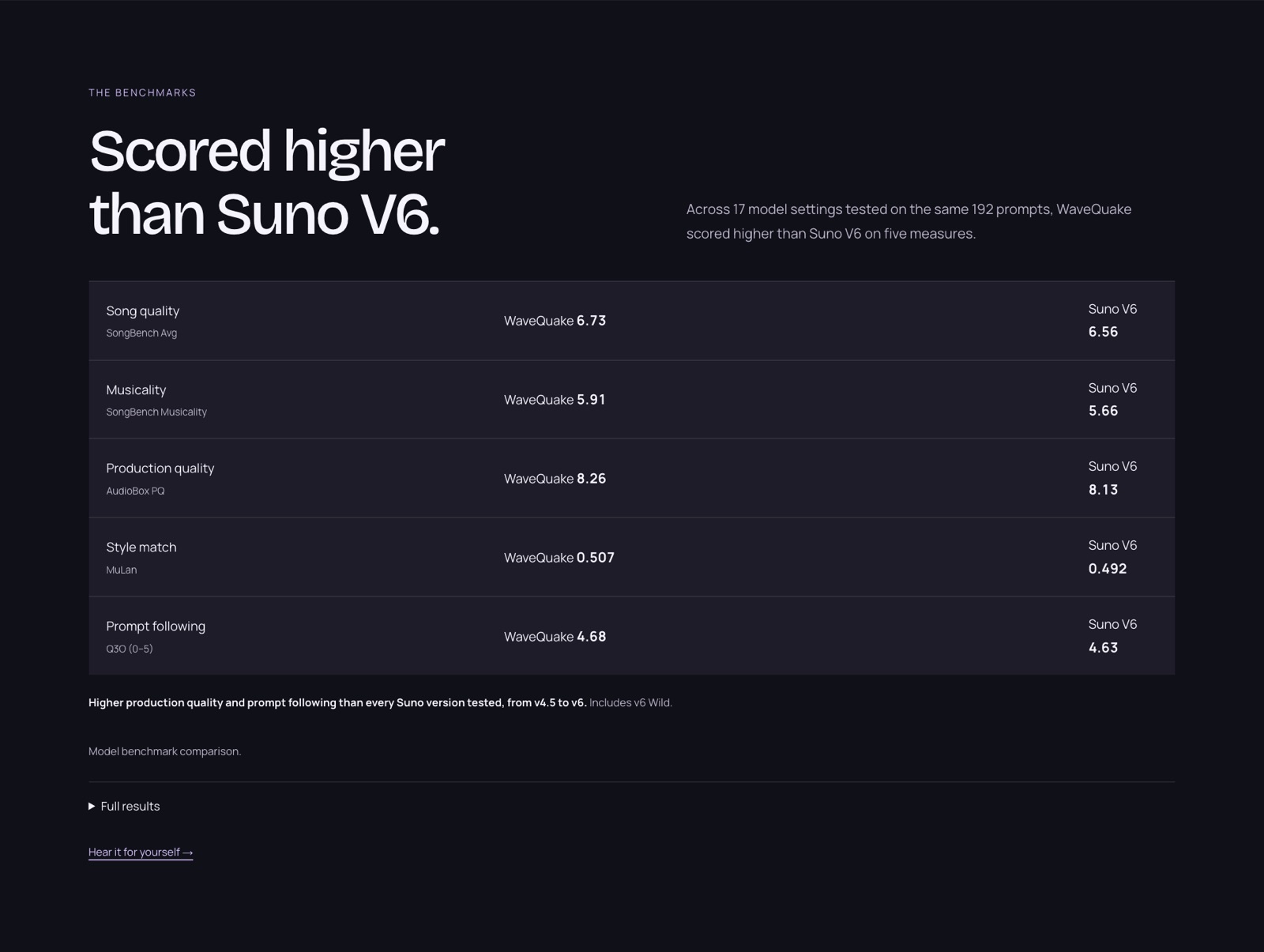 WaveQuake's published benchmark panel, captured 23 October 2026.
Create covers and remixes
Give popular songs both audio and lyrics a fresh sound and your own creative direction.
What Suno does now. Suno lists covers and remixes among its features, but its terms treat remixes of your songs in a way a seller should read twice. When you activate features that let other users remix your Outputs, "all Remixes shall be a joint work owned jointly and equally by you and the Remixer", and the Remix "may only be used for lawful, personal and non-commercial purposes, regardless of your subscription tier or whether the Remix is a permitted Download." The terms then repeat it: "Nothing in this paragraph permits commercial use of any Remix."
How WaveQuake fixes it. WaveQuake's studio reimagines songs from text or audio. You can rework your lyrics and sound direction, or upload a recording and guide a new arrangement with words, turning a demo into an acoustic ballad, a late-night soul take or a bigger pop arrangement. WaveQuake's terms set ownership simply: "As between you and WaveQuake, you own the rights in your Outputs to the extent those rights exist and the law permits you to own them." There is no remixer to share the result with, and the plan's commercial licence covers the rights WaveQuake can grant in it.
WaveQuake's own line on this feature is the one to follow: "Use material you have permission to reinterpret." Its pricing page adds that the licence "does not clear third-party material", so a reworking of someone else's song still needs that song's permissions before you sell it.
Capture an artist's style with Soundprint
Turn an artist or song reference into an editable sound direction for your own music.
The hardest part of selling a catalogue is sounding like one artist across twenty songs. Soundprint starts from a reference you already know. You "enter an artist, add an optional song reference and describe your own twist", and Soundprint suggests the genre, groove, instruments, vocal character and production as an editable prompt. You change what you want, keep your lyrics and create the song in the same window.
For a seller, the useful part is that the direction is written down. Save the edited prompt with the release and you can return to the same sound for the next single, the B-side and the remix pack instead of rebuilding it from memory. Each suggestion uses one request from the 2,000 writing requests in the plan, not your creation minutes.
WaveQuake's own footnote: "Soundprint guides style; it does not clone an artist's voice."
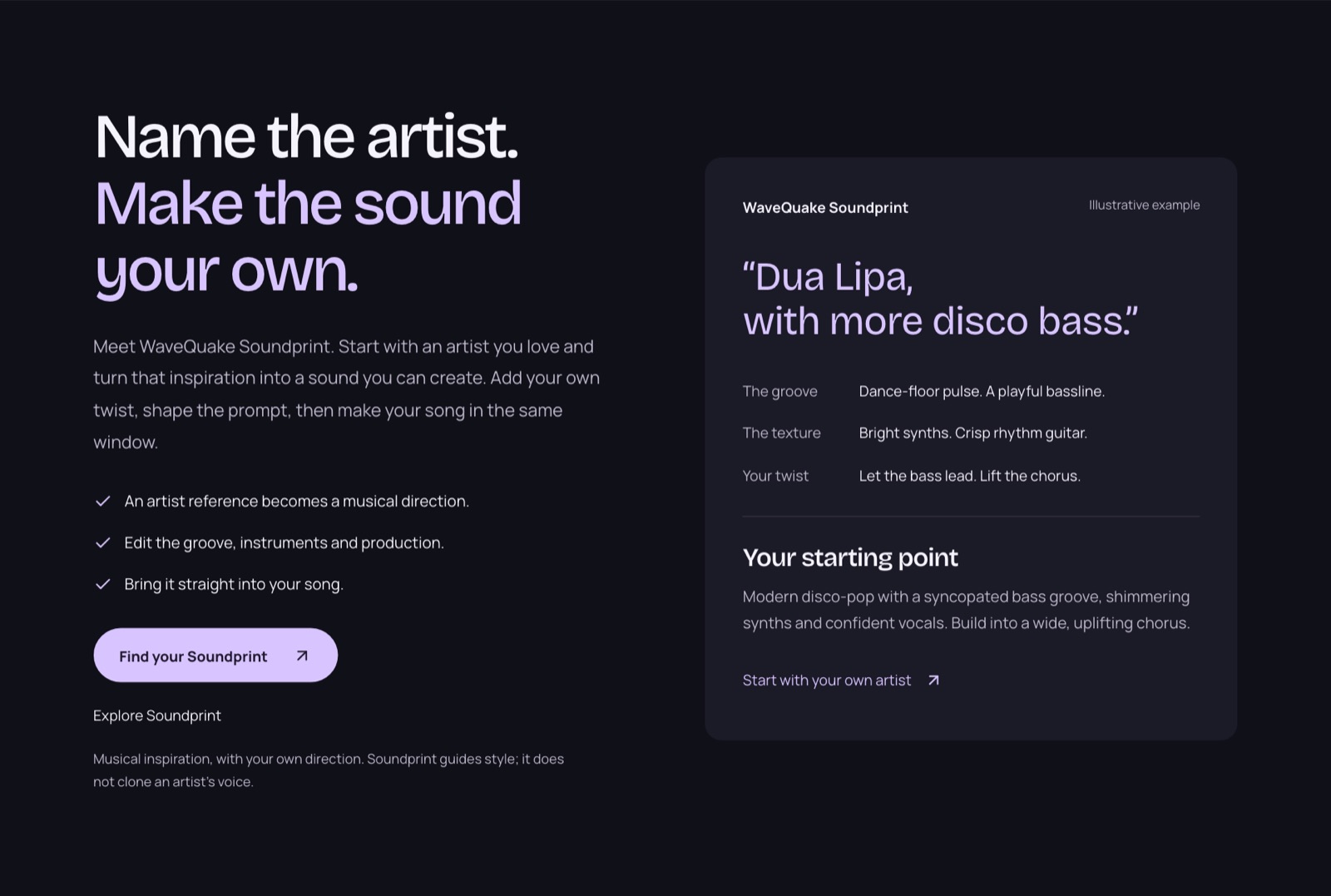 WaveQuake's Soundprint section, captured 23 October 2026. The artist named in the example is WaveQuake's own illustration.
Create your own AI artist
Save reusable voice profiles to give your tracks a recognizable vocal identity.
What Suno does now. Suno lets paying users record and create with their own voice, but read what you grant in return. The terms give Suno "a worldwide, non-exclusive, fully paid-up, sublicensable … assignable, royalty-free, perpetual, irrevocable right and license" to your Content, including for "improvement of our products and services, including the Service and the artificial intelligence and machine learning models related to the Service." They add: "This license to your Content and Voice Model includes a license to your likeness, voice rights and other indicia of your persona", and those uses are "made without compensation to you".
How WaveQuake fixes it. WaveQuake's artist profiles save a vocal direction (register, texture, delivery) and up to three recorded voices per account. Choose Change voice beside a finished track and the studio creates a separate version using your saved recording, leaving the original untouched. On data, WaveQuake's terms limit its permission to what is "reasonably necessary to perform your requested tools" and state that it does not authorise WaveQuake to "sell your Content as a dataset or use it to train generative models. Any separate training programme or promotional use needs a distinct informed opt-in."
That is the identity layer a catalogue needs: the same named artist, the same vocal brief, kept in your account rather than licensed away. WaveQuake's own footnotes apply: a recorded conversion uses creation minutes, and "vocal similarity varies".
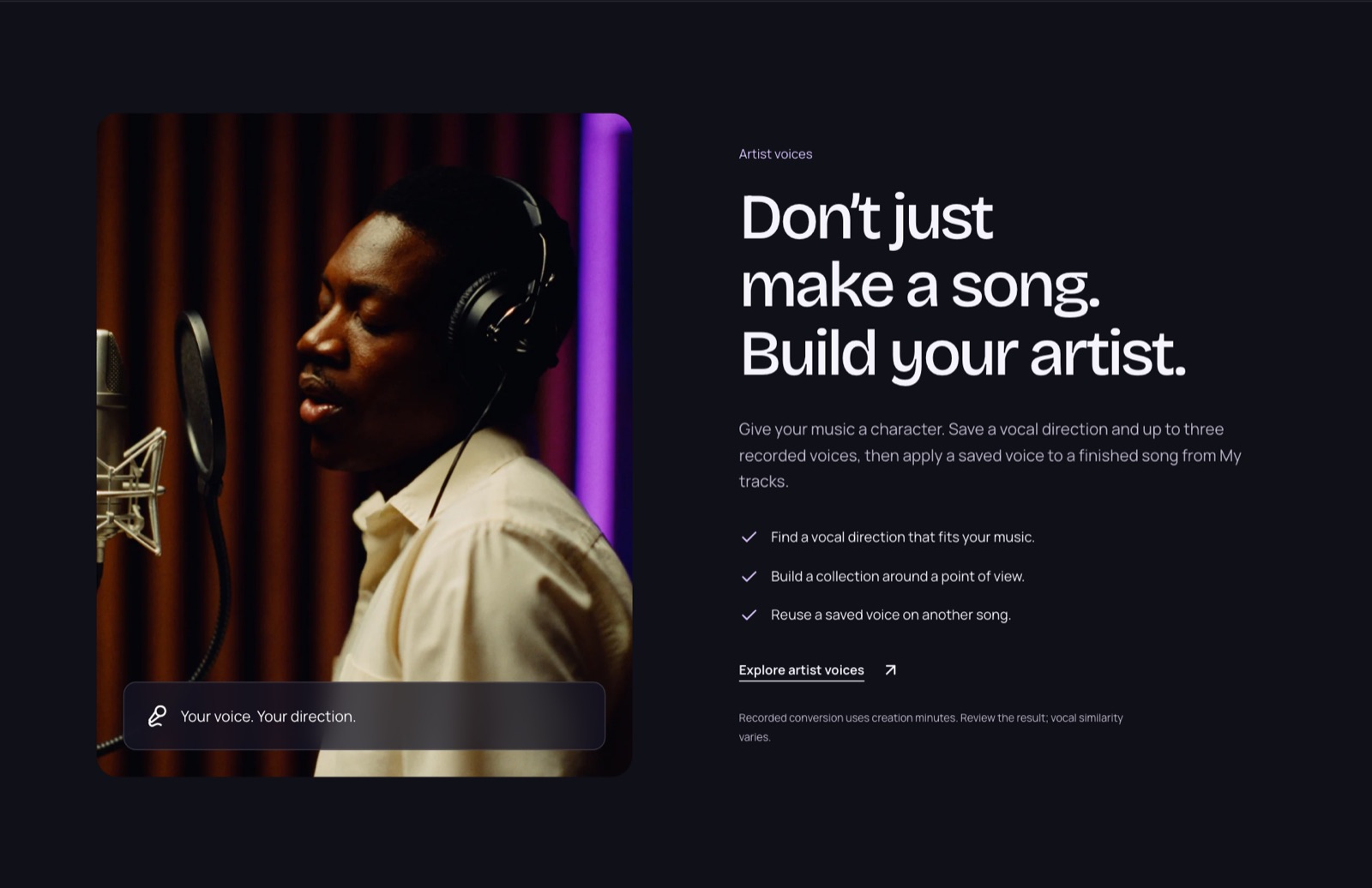 WaveQuake's artist voices section, captured 23 October 2026.
Commercial licence included. Keep your royalties
Use your music commercially, with 0% WaveQuake royalties, subject to the licence terms.
What Suno does now. On Suno the right to sell attaches to the download, not the song. Commercial use requires "a permitted download of that Output in accordance with the download allocations for your applicable service tier." Free-plan songs, says Suno's help centre, "cannot be monetized", and "starting a subscription after you made a great song will not give you a retroactive license for the song." A seller who finds a hit in their free-tier history cannot buy their way back to selling it.
How WaveQuake fixes it. One purchase includes the full commercial licence. WaveQuake's terms list what it covers, "releasing songs, monetising videos, supplying games and advertising, licensing recordings and delivering client work", and state that "WaveQuake takes no ownership share or share of your music royalties, and does not require a separate commercial-use upgrade". The permission "survives expiry or cancellation of your account". There is no download-gated licence to track, so the question "was this file a permitted download?" disappears from your release records.
The licence terms are the qualifier, in WaveQuake's words: "The licence covers rights WaveQuake can grant; it does not clear third-party material or guarantee exclusive output." Selling is still your job. WaveQuake does not distribute music or collect royalties, so pair it with the storefront or distributor you choose; our Played.fm review covers one direct-sales option and our distributor policy checklist covers the release side.
Professional mastering included
Polish your finished tracks without an extra mastering charge.
What Suno does now. Suno's pricing page lists credits, downloads, models, stems and editing tools across its plans. It lists no mastering service, so a Suno seller who wants a finished master budgets for one elsewhere.
How WaveQuake fixes it. Mastering is part of the plan. You choose Natural, Warm or Punch and get a separate 24-bit WAV with measured loudness and checked peaks, while your original stays alongside it to compare. WaveQuake's pricing page confirms that "Saving, playing, mastering and downloading do not spend creation minutes", so mastering a track does not cost you creation minutes either. For a catalogue, that means every release goes out with the same finishing chain, and the master is just one more file to download.
What switching costs: $149.99 once vs $288 a year
WaveQuake's founder offer is $149.99 once, tax included, and WaveQuake says the price "will go up to $499.99 after the founder offer." Suno's pricing page shows Premier at $24 a month on annual billing, which is $288 a year, the figure WaveQuake also quotes for comparison.
| Time on the plan | Suno Premier (billed yearly) | WaveQuake founder offer |
|---|---|---|
| Year 1 | $288 | $149.99 |
| Year 2 | $576 | $149.99 |
| Year 3 | $864 | $149.99 |
| Song downloads in that time | 60 a month | Unlimited |
The allowances are different shapes, and WaveQuake says so: its $149.99 buys 3,000 creation minutes as a one-time bank with no scheduled expiry and no monthly refill, plus 2,000 writing requests. Each generation returns two versions and only the longer one counts. When the bank runs out you can add minutes as optional one-time top-ups, and you can still play, master and download retained files without buying more. WaveQuake's terms also state "All sales are final." Read our pricing guide before you set your own prices off the back of a cheaper studio.
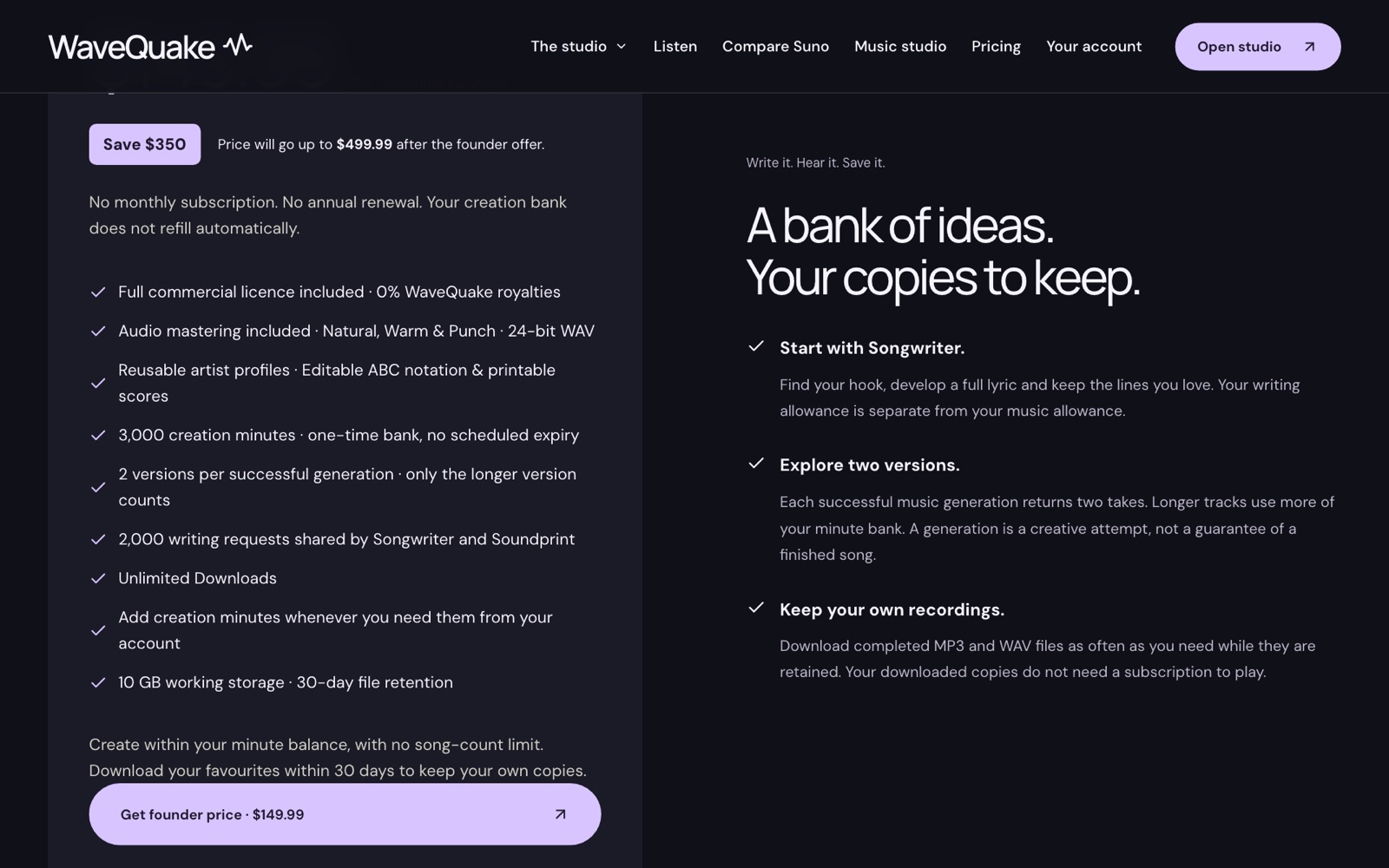 WaveQuake's pricing card, captured 23 October 2026: $149.99 once, 3,000 creation minutes, Unlimited Downloads, 2,000 writing requests and 30-day file retention.
How to move your catalogue from Suno to WaveQuake
Switching is a release-planning job, not a button. This is the order we would follow.
- Spend your remaining Suno downloads on the songs you intend to sell. Suno's terms say rights in a download you have obtained are perpetual and survive cancellation, so a permitted download is worth taking before you leave.
- Record which songs came from where. Keep the source, plan and date for every file in your release record; our release checklist has the fields.
- Rebuild your sound in WaveQuake. Use Soundprint and an artist profile to write down the direction your catalogue already has, then create new songs against it.
- Master and download as you go. Files are retained for 30 days, so keep your own copies of every take worth selling.
- Sell through your chosen storefront or distributor. WaveQuake's licence lets you sell; the shop and the audience are still yours to build.
The full product walk-through, with audio examples, is in our WaveQuake review.
Related reading
- WaveQuake review: building an artist catalogue
- Download limits and your release calendar
- Selling under Suno's September terms
- How to sell AI music: build a clear first offer
- How to price AI music
Frequently asked questions
What is the best Suno alternative for selling music?
For sellers building a catalogue, our pick is WaveQuake. It removes the download cap that now limits how much Suno music you can sell, includes a full commercial licence with 0% WaveQuake royalties, and costs $149.99 once on the founder offer instead of $288 a year for Suno Premier.
Why are people moving from Suno?
Since September 3, 2026, Suno caps song downloads (Pro 20 a month, Premier 60) and only permitted downloads can be used commercially. The caps include songs made before September 3, and unused downloads do not carry over. For anyone selling music, that turns a creative subscription into a rationed shop.
Does WaveQuake really have unlimited downloads?
Yes, under its terms "unlimited downloads" means downloading your available completed files as often as you wish, with no download credits or per-download charge. Creation itself uses the minute bank, and files are retained for 30 days, so download what you want to keep.
Can I sell songs I make with WaveQuake?
Yes. The plan includes a full commercial licence covering releases, sales, licensing and client work, with no royalty share and no separate commercial upgrade. The licence covers the rights WaveQuake can grant and does not clear third-party material, so anything you bring in needs its own permissions.
Do I lose rights to songs I already downloaded from Suno?
No. Suno's terms say commercial rights in a download you obtained are perpetual and are not affected by cancellation or downgrade. Songs you never downloaded, or made on the free plan, do not carry those rights.
Is WaveQuake better than Suno V6?
On song quality, WaveQuake scored 6.73 against Suno V6's 6.56 in a model benchmark comparison published by the model's research team. Those are model results, not human preference scores, so listen to the examples in our review before you commit.
How much does WaveQuake cost compared with Suno?
WaveQuake's founder offer is $149.99 once, which WaveQuake says will rise to $499.99. Suno Premier is $288 a year billed yearly. WaveQuake's price buys a one-time bank of 3,000 creation minutes with optional top-ups rather than a monthly refill.
Does WaveQuake distribute or sell my music for me?
No. WaveQuake is a browser music studio: it creates, masters and exports your songs. Distribution, storefronts and building an audience stay with the services you choose.